Google Drive Integration: Analyze Documents, Spreadsheets, and Presentations with AI

We’ve added support for Google services. Now the neural network can analyze any file you own: text documents, spreadsheets, or presentations stored in the cloud. If you actively work in the Google ecosystem and want to delegate routine tasks, simply send a file from the cloud to chat.
Do you manage your financial records in Google Sheets? Upload the spreadsheet to find errors, identify inconsistencies, or instantly generate a financial report.
Wrote a long article, and the client sent you a mountain of edits? Attach the document and ask the model to suggest corrections or rewrite the text based on the comments.
How does it work?
The file is attached using the paperclip icon in the lower right corner of the chat.
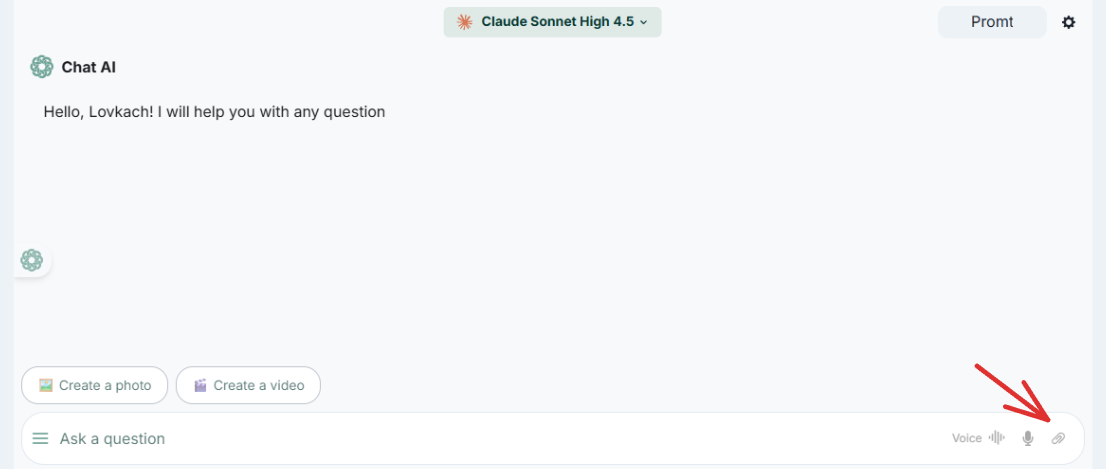
- Connect Google Drive. Click on the paperclip, then on the “google drive” button and allow access to your account.

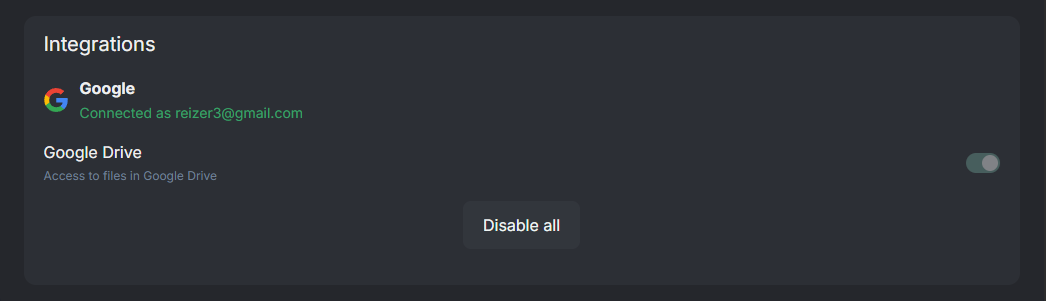
- Check your settings. After logging in, the “Integrations” tab will appear in your profile (Personal Data section).
- Get to work. Click on the paperclip in the chat, click on Google Drive, select the file you need.

-
And write a request in the chat.
-
For example: “Analyze the edits from the client and propose an updated version of the text.”
Advice: Choose an AI model based on a specific task. For example, Claude is excellent for creative writing and style, while Gemini is ideal for spreadsheet analysis.
Try it now 👇
Application (on Android)
Free access to Chat GPT and other neural networks
 Open Chat →


